 Balanced
Please keep this page open after payment.
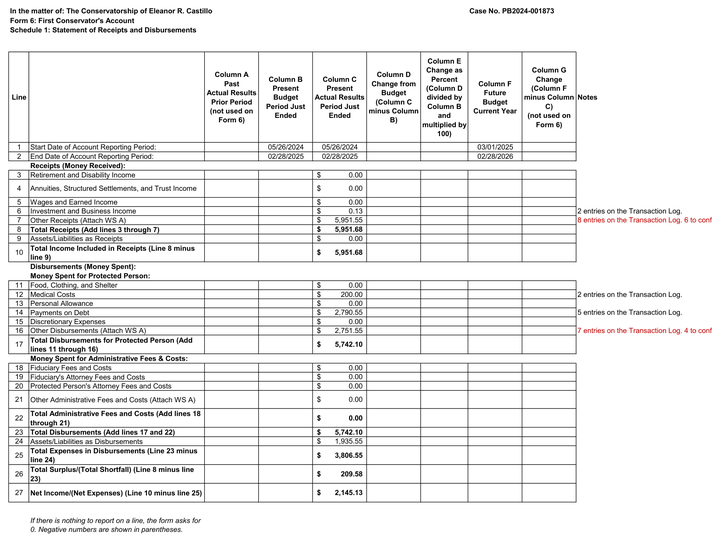
Inside a real Balanced workbook
Real Excel workbook pages generated by Balanced and anonymized for confidentiality.
Sample workbooks (Excel): First (Form 6) · Annual (Form 7) · Final (Form 8) · Simplified (Form 9)
Frequently Asked Questions
Your PDFs are processed securely and confidentially in your own browser and are never uploaded, stored or transmitted.
What is Balanced?
Balanced is web-based software that generates balanced, fully editable Arizona conservator’s account workbooks in Excel, keyed to the statewide Forms 6 to 9, directly from your PDF bank and brokerage statements. Balanced converts and organizes your statement data exactly as the statements show it, using disclosed, standard accounting conventions you can change. Everything beyond that comes from your own instructions. There is nothing to install: your PDF files are processed in your own web browser, and Balanced automatically prepares the account workbook from statement-traceable data, with each entry cited to the statement and page from which it was drawn. Customers pay $699 per accounting, with no subscription.
When is an Arizona conservator’s account due?
- First account (Form 6): on the first anniversary of the date the letters were issued, unless the court orders otherwise; it covers the first nine months after the letters and budgets the next twelve
- Annual account (Form 7): on the second and each later anniversary of the date the letters were issued, unless the court orders otherwise
- Final account (Form 8): 90 days after the conservatorship ends, unless the court orders otherwise, with a Statement of Asset Distribution
- Simplified account (Form 9): only when the court has ordered it, on the anniversary of the date the letters were issued
Sources: the statewide form instructions on the Conservator Account Forms page, and A.R.S. 14-5419, under which a conservator accounts to the court at least every year and when the conservatorship ends.
Which Arizona accounts does Balanced prepare?
Conservator’s accounts for an adult or a minor: the first account (Form 6), the annual account (Form 7), the final account (Form 8) and the simplified account (Form 9). You choose which when you order. Estate and trust accounts are not offered for Arizona.
What is in the workbook?
Every account is one Excel workbook keyed to the numbered lines of the statewide schedules, with a sheet for each of the following:
- Schedule 1: receipts and disbursements by the form’s categories, with the budget columns
- Worksheet A: other receipts, other disbursements and other administrative costs (Forms 6 and 7)
- Schedule 2: the assets and debts at the start and the end, and the cash reconciliation
- Worksheet B: other assets and debts
- Schedule 3 and Worksheet C: the sustainability estimate (not on Form 8)
- Transaction Log: every receipt and payment, by Schedule 1 category, with subtotals
- Asset Distribution: the Statement of Asset Distribution (Form 8)
- Financial Accounts: each account reconciled to its own statements
- Cash Transfers: moves between the conservator’s own cash accounts, which are not on the log
- Investment Activity: what happened inside the investment accounts, when there is any
The cover sheet, the conservator’s certification and the court’s review are on the official forms.
How are the budget and the investments handled?
The budget columns of Schedule 1 come from the court-approved budget (Form 5, or Column F of the last account), which bank statements do not show, so those cells are left for you to enter and the change columns calculate once they are filled. The same is true of the sustainability estimate’s judgment lines.
As the form instructions set out, an investment account is listed at its value on the statements at the start and the end of the period. Its trades, and income kept inside it, are not receipts or disbursements; money moved from it to a bank account is an asset turned into cash (lines 7 and 9), and money moved into it is an asset purchase (lines 16 and 24).
Why does an Arizona conservator’s account take so long to prepare?
Because traditionally it is built by hand. Every receipt, payment, sale and transfer on months or years of statements has to be found, understood, sorted onto the right line of the form and balanced to the penny. One missed or misplaced transaction throws the account out of balance, and finding it can take days. Balanced automates that work: it builds the account from your PDF statements, balanced and with each entry cited to its statement and page, so you spend your time reviewing it rather than building it.
How much does it cost?
$699 per accounting, paid once when you place your order. There is no subscription, no account to create, and no software to install. If you have a discount code, enter it on the Review & pay step.
How long will it take?
Most accounting workbooks are generated and delivered in about 1 hour, but generation times vary depending on the size and complexity of each accounting.
How is the accounting delivered?
By email, to the address you enter. You will receive two emails from info@balanced.law. The first arrives right away and confirms your order with the details you entered. The second arrives when your accounting is complete, with your Excel workbook attached.
Keep the workbook to prepare the next year’s account.
Is the Excel workbook editable?
Yes. The workbook is a standard Excel file, and every sheet is fully editable, so you can review, adjust, and add to it as you see fit.
Are the PDF files ever shared, uploaded, or transmitted?
No. Your PDF files are securely processed in your own web browser, on your own computer, and the PDF files themselves are never uploaded, shared, or transmitted.
What other documents can I include?
Any PDF file that helps explain how you want your account prepared or provides other relevant information. For example:
- The inventory, the approved budget (Form 5) or the last account
- Settlement statements for the sale of property
- A PDF of information & instructions describing transactions, payees, descriptions, and grouping or organizational preferences for receipts and disbursements
- Assets or activity that do not appear on the statements
- Other statements and ledgers
- Any document that provides or describes relevant accounting information, requests, or preferences
For information & instructions, you can use the optional template.
Other documents are optional. If you have none, press Next to skip that step.
Does Balanced offer other products or services?
No. Balanced Legal Technology does one thing: fiduciary accounting technology. There is no suite of other products or services, just a single, highly specialized focus on fiduciary accounting automation technology and setting a new state-of-the-art for accounting accuracy.
How accurate is Balanced?
Balanced reconciles each account to its own statements and traces each line to its source, with a citation on each data row to the statement and page it came from. Balanced accountings are impartial and verifiable.
Every accounting is a preliminary draft for the fiduciary’s own review and verification before it is relied on or filed.
Who developed Balanced?
Balanced was founded and developed by Marc Joyce, a practicing California trusts and estates attorney with a passion for computers and technology. Questions? Contact us or call (310) 780-8614.
Guides: Arizona conservatorship accounting · The annual account (Form 7) · The first account (Form 6) · The final account (Form 8) · Form 7 example · The transaction log · The inventory (90 days) · Maricopa County filing · All states
Help: Deadlines · The budget (Form 5) · Fiduciary fees and licensing · Free conservator’s account worksheet (Excel)
More guides: Response to Court Accountant Report (Arizona Conservator’s Account) · Pima County Conservator’s Account: Filing and the Probate Accountant · The Arizona Conservator’s Bond: Amount, Changes and Release · Restricted Accounts in an Arizona Conservatorship (Form 10) · Arizona Guardian’s Annual Report vs the Conservator’s Account · When the Protected Person Dies: The Arizona Conservator’s Final Steps · Selling a House in an Arizona Conservatorship: How It Shows on the Account · Objecting to an Arizona Conservator’s Account or Budget