 Balanced
Please keep this page open after payment.
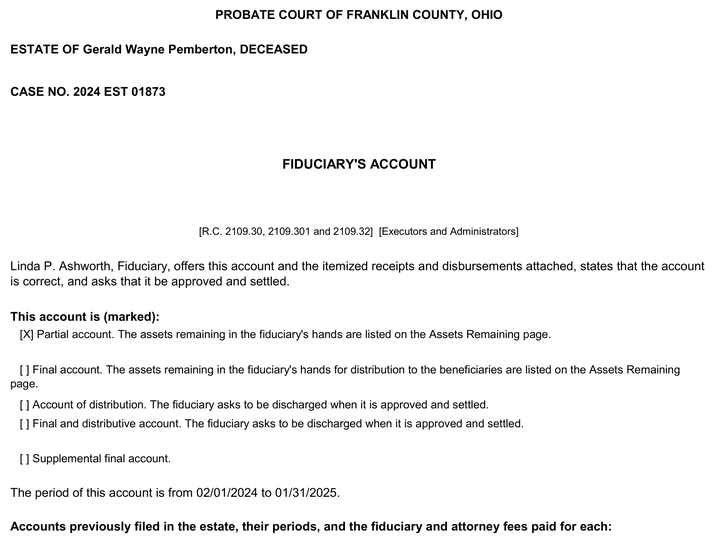
Inside a real Balanced workbook
Real Excel workbook pages generated by Balanced and anonymized for confidentiality.
Sample workbooks (Excel): Estate, partial · Estate, final · Guardianship, partial · Guardianship, final
Frequently Asked Questions
Your PDFs are processed securely and confidentially in your own browser and are never uploaded, stored or transmitted.
What is Balanced?
Balanced is web-based software that generates balanced, fully editable Ohio account workbooks in Excel, in the layout of Standard Probate Form 13.0 or Form 15.8, directly from your PDF bank and brokerage statements. Balanced converts and organizes your statement data exactly as the statements show it, using disclosed, standard accounting conventions you can change. Everything beyond that comes from your own instructions. There is nothing to install: your PDF files are processed in your own web browser, and Balanced automatically prepares the account workbook from statement-traceable data, with each entry cited to the statement and page from which it was drawn. Customers pay $699 per accounting, with no subscription.
When is an Ohio account due?
- Executors and administrators: a final and distributive account within six months after appointment, unless an exception in R.C. 2109.301(B)(1) applies; otherwise an account not later than thirteen months after appointment, and then at least once a year until the estate is closed, unless a partial account is waived (R.C. 2109.301)
- Executors and administrators, final account: within thirty days after completing the administration of the estate, or as the court orders (R.C. 2109.301(A))
- Guardians: at least once in each two years, and a final account within thirty days after completing the administration of the ward’s estate (R.C. 2109.302)
More detail: Ohio probate accounting deadlines.
Which Ohio accounts does Balanced prepare?
Partial and final accounts for a decedent’s estate, in the layout of Standard Probate Form 13.0 with Forms 13.1 and 13.2 (a final account that distributes everything is marked as the final and distributive account), and partial and final guardian’s accounts, in the layout of Form 15.8. You choose the kind of accounting, partial or final, and the county when you order. Testamentary trust accounts are not offered for Ohio.
What is in the workbook?
Every account is one Excel workbook in the layout of the Ohio form, with a sheet for each of the following:
- Account: the account itself, with the recapitulation of receipts and disbursements and the balance remaining, each a live formula over the lists
- Receipts Disbursements: every receipt and disbursement, itemized under its recapitulation line, with a voucher number on every disbursement
- Assets Remaining: what is held at the end of the period: tangible, intangible and real property
- Changes in Investments: the purchases and sales during the period
- Exhibit of Assets: each account and holding at the end of the period, with its statement
- Voucher Index: a number for every disbursement
- Attachments: what goes with the account
- Not in Account: transfers between the estate’s own accounts, when there are any
An estate account’s line names are Form 13.0’s own. The signatures and the hearing are on the official form.
How are sales, gains and losses handled?
As Form 13.0 lays them out: property on hand at the start and not sold is charged as a receipt at its value, and property that was sold is charged at its proceeds, so a gain or loss is inside the figures and never shown on a line of its own. A land sale shows its gross proceeds, with the closing statement (R.C. 2109.301; Civ.R. 73.15(B)).
Unless a prior account (such as your last Balanced workbook) is included or a different value is given in your information & instructions, each holding’s starting value is its value on the statements at the start of the accounting period. From there, Balanced tracks each holding lot by lot, first-in, first-out, and measures each sale against that value, not the brokerage’s printed cost basis.
Why does an Ohio account take so long to prepare?
Because traditionally it is built by hand. Every receipt, disbursement, sale and transfer on months or years of statements has to be found, understood, sorted onto the right line of the form and balanced to the penny. One missed or misplaced transaction throws the account out of balance, and finding it can take days. Balanced automates that work: it builds the account from your PDF statements, balanced and with each entry cited to its statement and page, so you spend your time reviewing it rather than building it.
How much does it cost?
$699 per accounting, paid once when you place your order. There is no subscription, no account to create, and no software to install. If you have a discount code, enter it on the Review & pay step.
How long will it take?
Most accounting workbooks are generated and delivered in about 1 hour, but generation times vary depending on the size and complexity of each accounting.
How is the accounting delivered?
By email, to the address you enter. You will receive two emails from info@balanced.law. The first arrives right away and confirms your order with the details you entered. The second arrives when your accounting is complete, with your Excel workbook attached.
Keep the workbook to prepare the next account.
Is the Excel workbook editable?
Yes. The workbook is a standard Excel file, and every sheet is fully editable, so you can review, adjust, and add to it as you see fit.
Are the PDF files ever shared, uploaded, or transmitted?
No. Your PDF files are securely processed in your own web browser, on your own computer, and the PDF files themselves are never uploaded, shared, or transmitted.
What other documents can I include?
Any PDF file that helps explain how you want your account prepared or provides other relevant information. For example:
- The inventory and appraisal (Form 6.0 for a decedent’s estate, Form 15.5 for a guardianship) or the last account
- Closing statements for the sale of property
- A PDF of information & instructions describing transactions, payees, descriptions, and grouping or organizational preferences for receipts and disbursements
- Assets or activity that do not appear on the statements
- Other statements and ledgers
- Any document that provides or describes relevant accounting information, requests, or preferences
For information & instructions, you can use the optional template.
Other documents are optional. If you have none, press Next to skip that step.
Does Balanced offer other products or services?
No. Balanced Legal Technology does one thing: fiduciary accounting technology. There is no suite of other products or services, just a single, highly specialized focus on fiduciary accounting automation technology and setting a new state-of-the-art for accounting accuracy.
How accurate is Balanced?
Balanced reconciles each account to its own statements and traces each line to its source, with a citation on each data row to the statement and page it came from. Balanced accountings are impartial and verifiable.
Every accounting is a preliminary draft for the fiduciary’s own review and verification before it is relied on or filed.
Who developed Balanced?
Balanced was founded and developed by Marc Joyce, a practicing California trusts and estates attorney with a passion for computers and technology. Questions? Contact us or call (310) 780-8614.
Guides: Ohio probate accounting · How to fill out Form 13.0 · Form 13.0 example · Ohio guardian’s account · Ohio executor fees · All states
Help: Deadlines · Free Form 13.0 worksheet (Excel)
More guides: How to Fill Out Ohio Form 6.0, Inventory and Appraisal · How to Close an Estate in Ohio: The Final Account · Ohio Waiver of Partial Account (Form 13.4) · Ohio Account Hearings, Notice and Exceptions · Late Ohio Probate Accounts: Citations and Penalties · Franklin County Probate Court (Columbus): Estate and Guardian Accounts · Cuyahoga County Probate Court (Cleveland): Estate Accounts · Hamilton County Probate Court (Cincinnati): Fiduciary Accounts