 Balanced
What it is
A fiduciary accounting has traditionally been built by hand, whether on paper, in a spreadsheet or in fiduciary accounting software: someone goes through every statement, classifies every transaction, follows every security’s carry value and works until the two sides of the summary agree. Automated fiduciary accounting replaces that work with technology. You add the PDF statements; the accounting is generated, schedule by schedule, with each account reconciled to its own statements and the whole balanced to the penny.
Balanced converts and organizes your statement data exactly as the statements show it, using disclosed, standard accounting conventions you can change. Everything beyond that comes from your own instructions.
Have the statements? Balanced converts and organizes the data on them into this accounting, in the Probate Code format, as one editable Excel workbook balanced to the penny. Scanned or incomplete statements work.
- Developed by a California trusts and estates attorney
- Works with any PDF statement, downloaded or scanned
- Statement entries are cited to the PDF and page they
came from, for easy verification - A fully editable Excel workbook, emailed in about 1 hour
$699 Flat. No Subscription. No Install.
This has by far been the best user-experience and I’ve been really impressed with your product thus far.
Kelsey B. Cooper, Esq., California Estate Planning Services PC
What it does
- Classifies each receipt and disbursement to the right schedule
- Follows each security’s carry value lot by lot through purchases, sales, reinvestments and corporate actions, and calculates each gain and loss from carry value
- Balances each account on its own, and the accounting as a whole
- Lays it out in the California Probate Code §§1060–1064 format for trusts and probate estates, or the Judicial Council GC-400 layout for conservatorships and guardianships
- Cites the statement and page behind each row, so the result can be checked line by line
- Delivers one fully editable Excel workbook, with every schedule linked to the summary
What stays with the fiduciary
Judgment. The fiduciary reviews and verifies the accounting before relying on it or filing it, and decides the questions only a fiduciary can: how an item should be treated, what the information & instructions should explain, what the court needs to know. Anything the statements cannot show can be described in the information & instructions and is reflected in the accounting.
Who it is for
Balanced is built for professional fiduciaries, trust and estate attorneys and their paralegals, CPAs, and individual trustees, executors and conservators with a California accounting to prepare: a first account, a final account, or a subsequent accounting that continues from the last. It is trust and estate accounting software that works differently: the accounting is generated from the statements, not entered by hand. For a trustee, it is trust accounting software and court accounting software in one.
Praise for Balanced
“This has by far been the best user-experience and I’ve been really impressed with your product thus far.”
“I’d also just like to say that I was a trusts & estates paralegal for 6 years prior to becoming an attorney myself, so I’ve done hundreds of accountings manually. I’ve also tried countless other ‘trust accounting’ products. This has by far been the best user-experience and I’ve been really impressed with your product thus far. Myself and my firm will be repeat customers.”
California Estate Planning Services PC
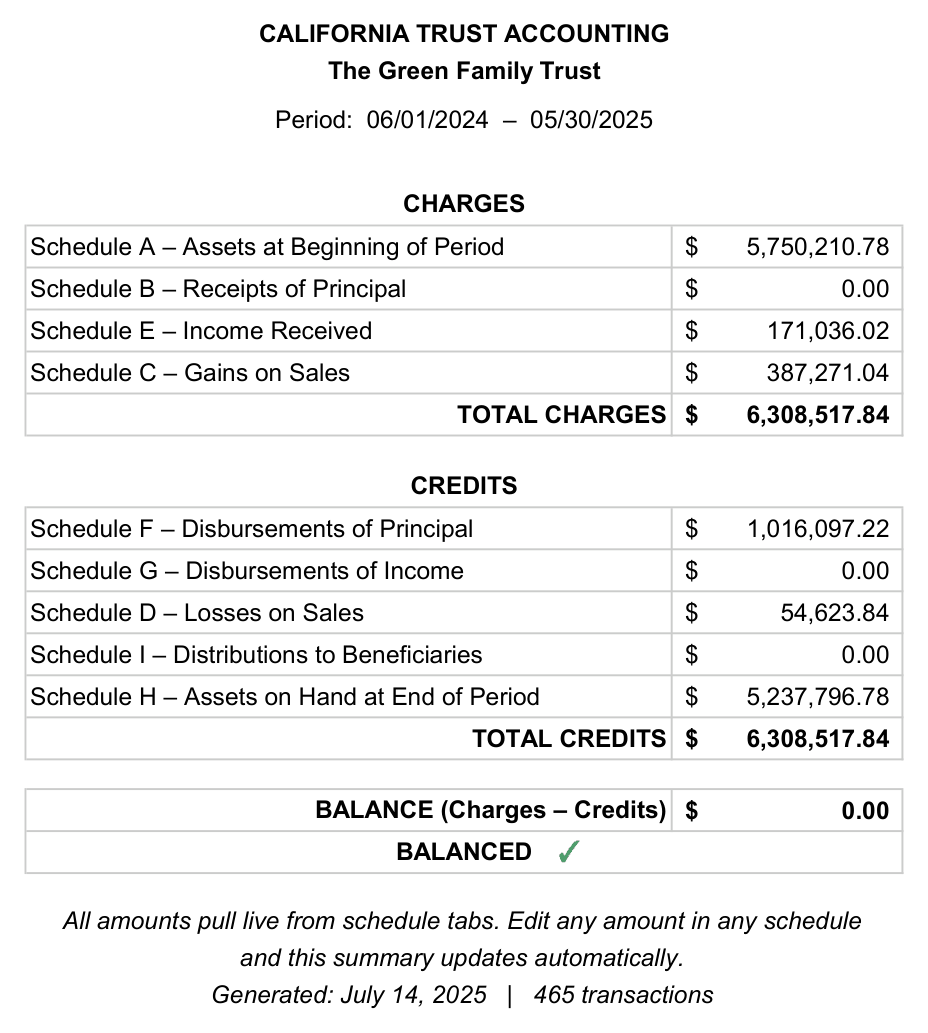
Inside a real Balanced workbook
$699 Flat. No Subscription. No Install.
See it for yourself
Balanced is a new kind of software for California fiduciary accountings. From the PDF bank and brokerage statements, Balanced converts and organizes the statement data into the accounting exactly as the statements show it, using disclosed, standard accounting conventions you can change; everything beyond that comes from your own instructions. Most are generated and delivered in about 1 hour, rather than the days, weeks or months of manual work an accounting otherwise takes. Transactions are classified to their schedules, carry values tracked lot by lot, each account reconciled to its own statements, the summary balanced to the penny, and each entry cited to the statement and page it came from, delivered as one fully editable Excel workbook. $699 per accounting.
See what it produces: a complete sample trust accounting, a probate estate accounting example and a GC-400 conservatorship accounting.
Ready to generate yours? Add the PDF statements for the accounting period. Your PDFs stay on your computer.
$699 Flat. No Subscription. No Install.