 Balanced
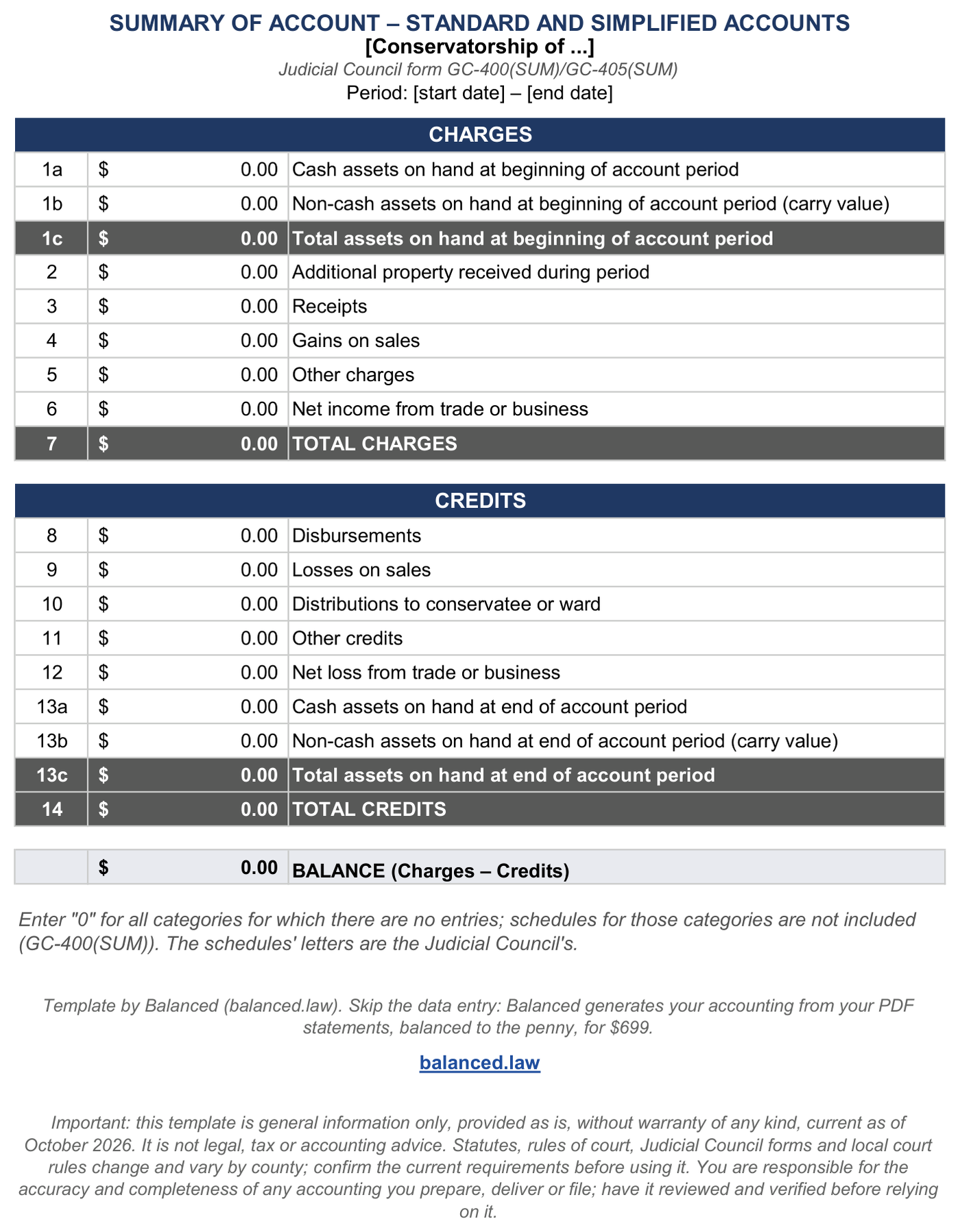
This is a free Excel template laid out like the Judicial Council’s GC-400 standard account for California conservatorship accounting by conservators and guardians of the estate. The Summary of Account sheet is linked to the schedules, so the totals and the balance update as you type. Under rule 7.575(e) your own schedules may replace the optional GC-400 schedule forms if they use the same categories, information and format; the summary itself goes on the Judicial Council’s GC-400(SUM) form.
Free: the template and a finished example. No email, no sign-up.
Your template is downloading.
This template is the format, not the work. The work is finding every transaction on every statement, placing each on the right schedule, following carry values lot by lot, and balancing each account to the penny. That takes days or weeks by hand, and one mistake throws off the whole summary. Balanced converts and organizes your statements into this same workbook for $699.
Have the statements? Balanced converts and organizes the data on them into this accounting, in the GC-400 format, as one editable Excel workbook balanced to the penny. Scanned or incomplete statements work.
- Developed by a California trusts and estates attorney
- Works with any PDF statement, downloaded or scanned
- Statement entries are cited to the PDF and page they
came from, for easy verification - A fully editable Excel workbook, emailed in about 1 hour
$699 Flat. No Subscription. No Install.
This has by far been the best user-experience and I’ve been really impressed with your product thus far.
Kelsey B. Cooper, Esq., California Estate Planning Services PC
Is the account due soon? Check your deadline.
What happens if the accounting is late
Courts take a late accounting seriously, and the consequences fall on you personally.
- Your first account is due one year after appointment, then at least every two years (Prob. Code §2620(a)).
- When an account is late, the court sends written notice: file it and set it for hearing within 30 days (§2620.2(a)).
- Missing that deadline is contempt of court (§2620.2(b)).
- If it is still not filed, the court must do one or more of these: remove you, cite you for contempt, suspend your powers and appoint a temporary conservator or guardian whose fees can be charged to you, or appoint a lawyer for the conservatee or ward. It reports what it did to the Professional Fiduciaries Bureau (§2620.2(c)).
Most Balanced accountings are delivered in about 1 hour. Add your statements
What the template is
An Excel workbook that follows the layout of the Judicial Council’s GC-400 standard account: the Summary of Account, GC-400(SUM), followed by the supporting schedules, with receipts and disbursements grouped into the form’s categories and subtotaled. The summary is linked to each schedule, so it updates as you enter amounts. Under rule 7.575 of the California Rules of Court the Summary of Account form itself is mandatory; the official forms are at courts.ca.gov.
Download the free Excel template
Harder than it looks. Balanced converts your PDF statements into this workbook, balanced to the penny, for $699.
The work behind the template
A template supplies the format. The account itself requires each receipt and disbursement on each statement for the period to be assigned to its GC-400 category, check numbers and court order dates to be recorded, cash and non-cash assets to be stated separately at carry value, and the Summary of Account to balance exactly. For a conservatorship with several accounts, that is days, weeks or even months of manual work. Each form is walked through in how to fill out the GC-400.
How to use the template
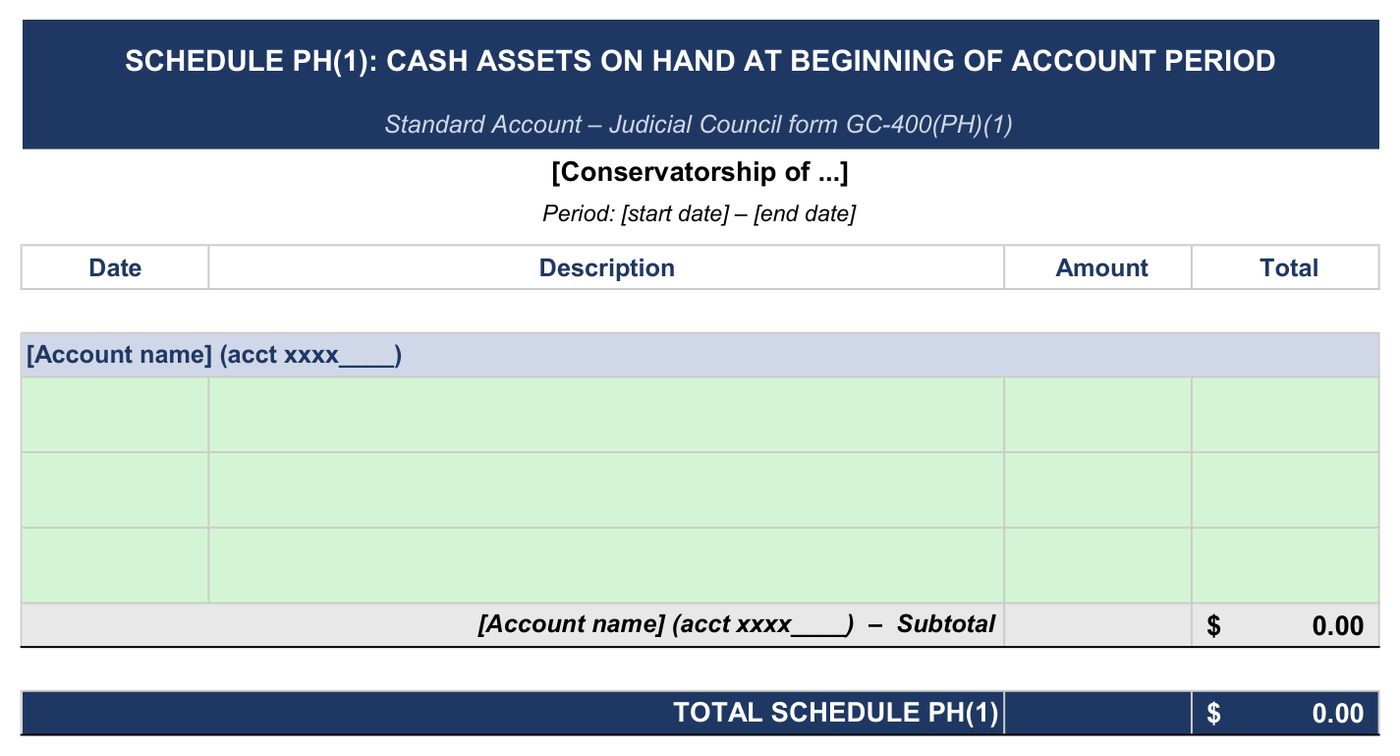
- Enter each account’s cash on hand at the beginning on PH(1), and non-cash assets at carry value on PH(2).
- Enter each receipt on the A schedule for its category, with the date and the source.
- Enter each disbursement on the C schedule for its category, with the date, payee, purpose and check number, and the order date for fees.
- Enter gains, losses, distributions and other charges or credits on their schedules.
- Enter cash and non-cash assets on hand at the end on E(1) and E(2).
- Check the Summary of Account: the balance should be zero. If it is not, a transaction or a value is missing.
- Copy the summary totals onto the Judicial Council GC-400(SUM) form and leave out the schedules with no entries.
The forms the template follows
The standard-account forms are below. The template has a sheet for each of them except GC-400(NI), GC-400(NL) and GC-400(G): net income or net loss from a trade or business, and liabilities at the end of the period, are added as their own schedules when the estate has them.
| Form | What goes on it |
|---|---|
| GC-400(SUM) | Summary of Account. Carries each schedule’s total; total charges equal total credits. Required in all accountings (rule 7.575(e)). |
| GC-400(PH)(1), GC-400(PH)(2) | Cash, and non-cash assets, on hand at the beginning of the period. |
| GC-400(AP) | Additional property received during the period. |
| GC-400(A)(1) to GC-400(A)(6) | Receipts by category: dividends, interest, pensions and annuities, rent, Social Security and other public benefits, other receipts. |
| GC-400(B) | Gains on sales. |
| GC-400(NI) | Net income from a trade or business. |
| GC-400(NL) | Net loss from a trade or business. |
| GC-400(OCH) | Other charges. |
| GC-400(C)(1) to GC-400(C)(11) | Disbursements by category: caregiver, care facility, education, fiduciary and attorney fees, general administration, investment, living, medical, property sale, rental property, other. |
| GC-400(D) | Losses on sales. |
| GC-400(DIST) | Distributions to the conservatee or ward. |
| GC-400(OCR) | Other credits. |
| GC-400(E)(1), GC-400(E)(2) | Cash, and non-cash assets, on hand at the end of the period. |
| GC-400(F) | Changes in form of assets, such as purchases of securities. |
| GC-400(G) | Liabilities at the end of the period. |
Every GC-400 form, by number
The Judicial Council numbers the standard-account forms GC-400 and the simplified-account forms GC-405; a form used in both carries both numbers, and the suffix names the schedule’s letter or subject (rule 7.575(e)(1) to (4)). Here is every form in the series, with its title as the Judicial Council publishes it, whether it belongs to the standard account, the simplified account or both, and which side of the Summary of Account its total goes to. Each number links to the form on the courts’ self-help site.
| Form | Title | Account | On the summary |
|---|---|---|---|
| GC-400(SUM) | Summary of Account | Both (also numbered GC-405(SUM)) | Required in every account; carries each schedule’s total |
| GC-400(PH)(1) | Cash Assets on Hand at Beginning of Account Period | Both | Charges |
| GC-400(PH)(2) | Non-Cash Assets on Hand at Beginning of Account Period | Both | Charges |
| GC-400(AP) | Additional Property Received During Period of Account | Both | Charges |
| GC-400(A)(1) | Schedule A, Receipts, Dividends | Standard | Charges |
| GC-400(A)(2) | Schedule A, Receipts, Interest | Standard | Charges |
| GC-400(A)(3) | Schedule A, Receipts, Pensions, Annuities, and Other Regular Periodic Payments | Standard | Charges |
| GC-400(A)(4) | Schedule A, Receipts, Rent | Standard | Charges |
| GC-400(A)(5) | Schedule A, Receipts, Social Security, Veterans’ Benefits, Other Public Benefits | Standard | Charges |
| GC-400(A)(6) | Schedule A, Receipts, Other Receipts | Standard | Charges |
| GC-405(A) | Schedule A, Receipts | Simplified | Charges |
| GC-400(B) | Schedule B, Gains on Sales | Both | Charges |
| GC-400(NI) | Net Income From a Trade or Business | Standard | Charges |
| GC-400(OCH) | Other Charges | Both | Charges |
| GC-400(C)(1) | Schedule C, Disbursements, Conservatee’s Caregiver Expenses | Standard | Credits |
| GC-400(C)(2) | Schedule C, Disbursements, Conservatee’s Residential or Long-Term Care Facility Living Expenses | Standard | Credits |
| GC-400(C)(3) | Schedule C, Disbursements, Ward’s Education Expenses | Standard | Credits |
| GC-400(C)(4) | Schedule C, Disbursements, Fiduciary and Attorney Fees | Standard | Credits |
| GC-400(C)(5) | Schedule C, Disbursements, General Administration Expenses | Standard | Credits |
| GC-400(C)(6) | Schedule C, Disbursements, Investment Expenses | Standard | Credits |
| GC-400(C)(7) | Schedule C, Disbursements, Living Expenses | Standard | Credits |
| GC-400(C)(8) | Schedule C, Disbursements, Medical Expenses | Standard | Credits |
| GC-400(C)(9) | Schedule C, Disbursements, Property Sale Expenses | Standard | Credits |
| GC-400(C)(10) | Schedule C, Disbursements, Rental Property Expenses | Standard | Credits |
| GC-400(C)(11) | Schedule C, Disbursements, Other Expenses | Standard | Credits |
| GC-405(C) | Schedule C, Disbursements | Simplified | Credits |
| GC-400(D) | Schedule D, Losses on Sales | Both | Credits |
| GC-400(NL) | Net Loss From a Trade or Business | Standard | Credits |
| GC-400(DIST) | Distributions to Conservatee or Ward | Both | Credits |
| GC-400(OCR) | Other Credits | Both | Credits |
| GC-400(E)(1) | Cash Assets on Hand at End of Account Period | Both | Credits |
| GC-400(E)(2) | Non-Cash Assets on Hand at End of Account Period | Both | Credits |
| GC-400(F) | Schedule F, Changes in Form of Assets | Both | Supporting schedule, not a summary line (Prob. Code §1063(b)) |
| GC-400(G) | Schedule G, Liabilities at End of Account Period | Both | Supporting schedule, not a summary line (Prob. Code §1063(g)) |
| GC-400(A)(C) | Schedule A and C, Receipts and Disbursements Worksheet | Standard | A worksheet for sorting receipts and disbursements into their categories |
Only the Summary of Account must be on the Judicial Council form in a standard account; the other standard forms may be replaced by your own schedules if they use the same categories, information and general format (rule 7.575(e)(6)). A simplified account must use GC-405(A) and GC-405(C), and the GC-405-numbered form for any asset or transaction a form covers (rule 7.575(e)(7), (8)). This template follows the standard forms; the GC-400 accounting example shows them completed, and how to fill out the GC-400 walks through them in order.
A first account and later accounts
A conservator’s or guardian’s first account is due one year after appointment, and later accounts at least every two years, or more often if the court orders (§2620(a)). For a first account, the property on hand at the beginning generally comes from the inventory and appraisal, and the statements filed with it include the ones showing each balance immediately before appointment (§2620(c)(2)). A later account starts where the last one ended: enter the prior account’s ending property on PH(1) and PH(2), at the same carry values. If an account is already late, see what happens when a conservatorship accounting is overdue; if the conservatee has died, see the final accounting after a conservatee’s death.
Your first GC-400 accounting: a checklist
- The period. The first account is due at the end of one year from appointment (§2620(a)); it begins on the date of appointment.
- The starting values. They come from the inventory and appraisal, which is made as of the date of appointment and filed within 90 days after it (§2610(a)). Cash goes on GC-400(PH)(1), everything else on GC-400(PH)(2).
- Assets found later. Property that was not on the inventory but came in during the period goes on GC-400(AP), not on the receipts schedules.
- The statements filed with it. For each account, the statement showing the balance immediately before appointment and the one showing the balance at the closing date (§2620(c)(2)), plus any escrow closing statement and care facility bills (§2620(c)(3), (4)).
- Market value. A first account needs the market value at the end of the period only; the beginning market value schedule starts with the second account (§1063(a)).
- Standard or simplified. Check the four conditions in rule 7.575(d)(1) before choosing GC-405; see the GC-405 simplified account.
- A very small estate. The court may waive the account if the conditions of §2628(a) are met: net value under $15,000 not counting the residence, monthly income under $2,000 not counting public benefits, and all income not kept spent for the conservatee or ward.
- Notice. At least 15 days before the hearing, to the conservatee or ward, the spouse or domestic partner and anyone who requested special notice (§2621, §1460).
- If it is late. The court gives written notice to file and set the account for hearing within 30 days (§2620.2(a)); see overdue conservatorship accountings.
Every later account starts where this one ends: the ending property on GC-400(E)(1) and (E)(2) becomes the next account’s GC-400(PH)(1) and (PH)(2), at the same carry values.
For professional fiduciaries
A professional fiduciary carries many estates, each on its own two-year cycle, and the court may cite or remove a fiduciary whose account is not filed in time (§2620.2(c)). The template gives one consistent layout for every estate. Balanced goes further: it converts and organizes each estate’s statements into this same GC-400 workbook for a flat $699, most in about 1 hour, with each entry cited to the statement and page it came from so your staff can check it line by line. For a later account, add the prior account and its ending balances carry forward. See a completed GC-400 example.
Standard GC-400 or simplified GC-405?
Under rule 7.575(c) and (d), the standard GC-400 account is the default. The simplified GC-405 account is allowed only when all of the conditions in the right-hand column are met. More on when the GC-405 simplified account may be used.
| Standard account, GC-400 | Simplified account, GC-405 | |
|---|---|---|
| When used | The default; required unless the simplified account is allowed | Only if all four conditions below are met |
| Estate value | Any | Appraised value, excluding the conservatee’s or ward’s personal residence, is less than $500,000 |
| Income-generating real property | Allowed | None |
| Interest in a trade or business | Allowed | None, whole or partial |
| Court order | Can be required by the court | The court has not directed a standard account |
| Long schedules | Not applicable | If the receipts or disbursements schedule would exceed five pages, the standard form is used for that schedule |
| Summary of Account | GC-400(SUM)/GC-405(SUM), required | GC-400(SUM)/GC-405(SUM), required |
What to gather before you start
- Each account’s statements for the whole period, with no month missing. For a first account, add the statements from immediately before appointment (§2620(c)).
- For a first account, the inventory and appraisal; for a later account, the prior account as filed, because its ending property is this account’s beginning property.
- The court orders that authorized fees or distributions, for their dates.
- Check registers or copies of checks, for check numbers and payees.
- The closing escrow statement for any real property sold, and the bills of any residential or long-term care facility (§2620(c)).
Checking your work
- The Summary of Account balances: total charges equal total credits.
- The cash on hand at the end, account by account, matches the closing statements filed with the account.
- The beginning values match the prior account’s ending values, or for a first account the inventory and appraisal.
- A transfer between two of the estate’s own accounts shows on both sides, or on neither.
- Fees and distributions carry the date of the order that authorized them.
Praise for Balanced
“This has by far been the best user-experience and I’ve been really impressed with your product thus far.”
“I’d also just like to say that I was a trusts & estates paralegal for 6 years prior to becoming an attorney myself, so I’ve done hundreds of accountings manually. I’ve also tried countless other ‘trust accounting’ products. This has by far been the best user-experience and I’ve been really impressed with your product thus far. Myself and my firm will be repeat customers.”
California Estate Planning Services PC
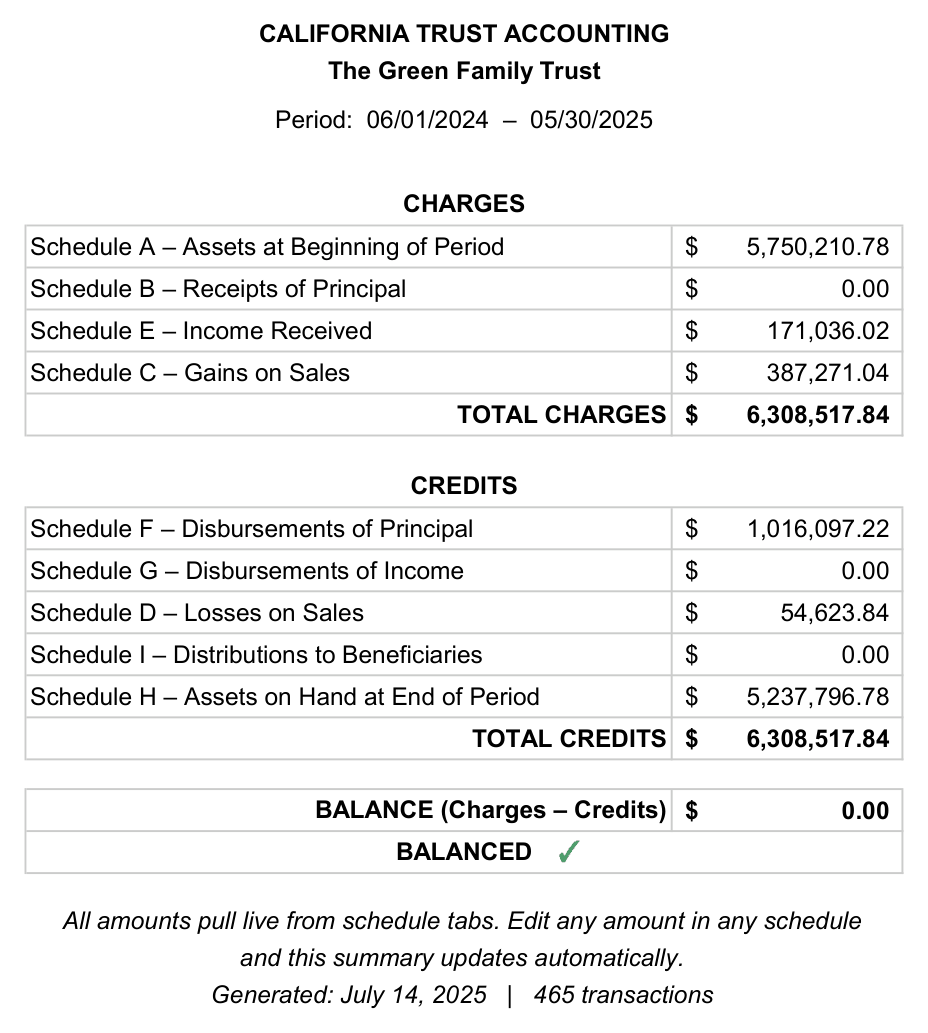
Inside a real Balanced workbook
Or have it generated from your statements, for $699
Review the workbook against your statements. Developed by a California trusts and estates attorney.
Balanced converts and organizes the data on the conservatee’s or ward’s PDF bank and brokerage statements into this same format, delivered as one fully editable Excel workbook.
- Add your PDF statements. They are processed in your own web browser and never uploaded.
- Transactions are classified to their schedules, carry values tracked lot by lot, and the summary balanced to the penny.
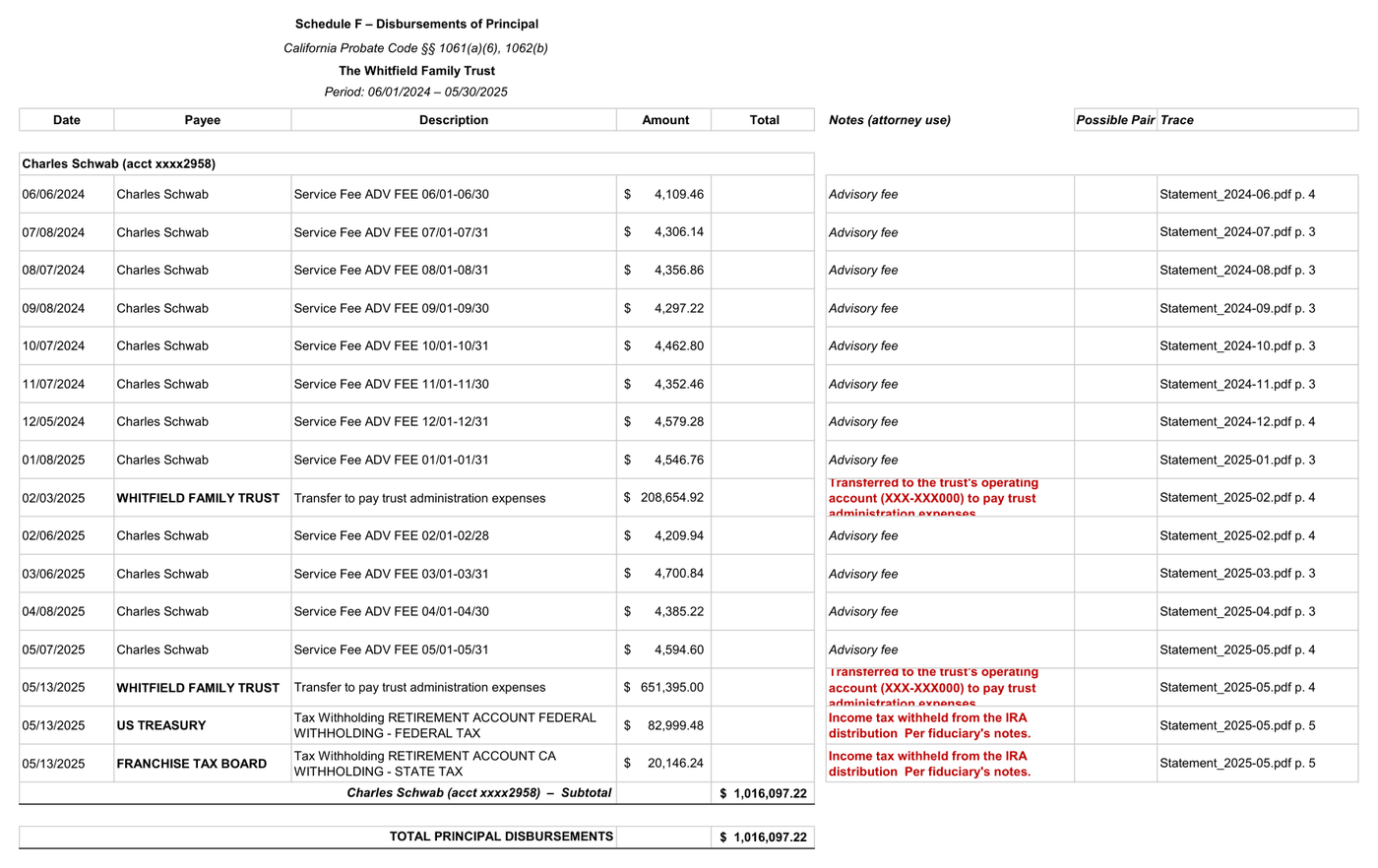
- Each entry is cited to the statement and page it came from, so checking goes quickly.
- Scanned statements work, and so does an incomplete set. Any figure that may be unclear is flagged for your review, and any missing statements are listed so you can find them.
- Most are delivered in about 1 hour.
| The template, by hand | Balanced | |
|---|---|---|
| Every transaction, on its schedule | You find each one on each statement, work out which schedule it belongs on, and hope nothing was missed. | Converted from your PDF statements and sorted onto its schedule |
| Sorting into GC-400 categories | You assign each receipt and disbursement | Assigned to the form’s categories and subtotaled |
| Carry value, gains and losses | You follow each lot by hand | Tracked lot by lot |
| Balancing | You find any difference yourself | Balanced to the penny |
| Checking it | Back to the statements for each figure | Each entry cited to its statement and page |
| Time | Days to weeks, sometimes months | Most delivered in about 1 hour |
| Cost | Free, plus your time | $699 flat |
Accountings are usually billed by the hour, so the cost is not known until the work is done. Balanced is $699, known before you start.
Add your statements first. Your PDFs stay on your computer.
$699 flat.
Common questions
Can I file the template instead of the Judicial Council forms?
The schedules may be your own if they use the same categories, give the same information and follow the same general format as the Judicial Council forms (rule 7.575(e)). The Summary of Account must be on form GC-400(SUM)/GC-405(SUM). Local court rules can add requirements, so check them.
Does it work for a guardianship?
Yes. The GC-400 standard account is used by guardians of the estate as well as conservators.
What about the simplified GC-405 account?
This template follows the standard GC-400 account. An estate that qualifies for the simplified account under rule 7.575(d) uses the GC-405 forms.
Is the template really free?
Yes. It is a free download, provided as is. It supplies the format; the classification of each transaction and the carry values are up to the person filling it in.
Generate the account with Balanced
Balanced does the conversion in a fraction of the time and cost. From the estate’s PDF bank and brokerage statements, Balanced converts and organizes the statement data into the GC-400 layout exactly as the statements show it, using disclosed, standard accounting conventions you can change: receipts and disbursements assigned to the form’s categories, check numbers where the statements show them, cash and non-cash assets stated separately, each account reconciled to its own statements, the Summary of Account balanced to the penny, and each entry cited to the statement and page it came from, delivered as one fully editable Excel workbook. Court order dates, and any check numbers the statements do not show, come from you; everything beyond the statement data comes from your own instructions. $699 per accounting.
Ready to generate yours? Add the PDF statements for the accounting period. Your PDFs stay on your computer.
$699 Flat. No Subscription. No Install.